Where to Watch FIFA Club World Cup 2026?

The FIFA Club World Cup has become one of the biggest events in club football, bringing together the champions from every continent to compete for the title of the world’s best club. Following the success of the expanded tournament format, millions of fans are searching for the easiest and most reliable ways to watch every match live.
Whether you’re supporting European giants, South American powerhouses, or emerging clubs from Asia, Africa, or North America, there are now more viewing options than ever before. Depending on where you live, you can watch the FIFA Club World Cup on free streaming services, subscription platforms, cable TV, or official broadcasters.
In this guide, we’ll explain where to watch the FIFA Club World Cup 2026, compare the most popular viewing methods, and show you how to record every match so you never miss a memorable moment.
1. Where to Watch FIFA Club World Cup 2026?

1.1 Watch on DAZN (Global Streaming Partner)
The easiest way for many football fans is DAZN, which has secured global streaming rights for the FIFA Club World Cup in many regions. FIFA and DAZN announced a partnership that allows all tournament matches to be streamed through the platform, with availability varying slightly depending on your country.
Why choose DAZN?
- Live coverage of every match
- HD streaming
- Match replays
- Highlights and analysis
- Available on Windows, Mac, Android, iPhone, Smart TVs, Fire TV, Apple TV, Chromecast, and game consoles
Pros:
- Official broadcaster
- Excellent video quality
- Multi-device support
Cons:
- Availability varies by region
- Some regions may require a subscription
1.2 Watch Through Local TV Broadcasters
Many countries have licensed broadcasters that air the tournament on television or via their streaming apps.
Examples include:
- FOX and FS1 (United States)
- Telemundo (Spanish-language coverage in the U.S.)
- BBC and ITV (United Kingdom, where applicable)
- SBS (Australia)
- beIN SPORTS (Middle East and North Africa)
- Zee5 and Unite8 Sports (India)
Watching through local broadcasters offers:
- Native-language commentary
- Studio analysis
- High-definition broadcasts
- Easy access on traditional television
Before kickoff, check your country’s official broadcaster to confirm coverage.
1.3 Stream Through Live TV Services
Cord-cutters can also watch the tournament using live TV streaming platforms that include sports channels.
Popular choices include:
- YouTube TV
- Hulu + Live TV
- Fubo
- Sling TV (selected regions)
These services often carry networks such as FOX or FS1, making them convenient for viewers who prefer streaming instead of cable.
Pros:
- No cable installation
- Cloud DVR on many services
- Mobile viewing
- Multiple devices
Cons:
- Monthly subscription fees
- Regional availability restrictions
1.4 Watch on Mobile Devices
Official broadcaster apps allow fans to enjoy matches wherever they are.
Examples include:
- DAZN app
- FOX Sports app
- Telemundo Deportes
- SBS On Demand
- Zee5
Most apps support:
- Live streaming
- Notifications
- Highlights
- Match replays
A stable Wi-Fi or 5G connection is recommended for uninterrupted HD streaming.
1.5 Watch Match Highlights
If you don’t have time to watch the full 90 minutes, official highlight videos are available shortly after each game.
You can usually find:
- Match highlights
- Goals
- Player interviews
- Tactical analysis
- Press conferences
These are available through official broadcaster platforms and FIFA’s official channels.
2. Bonus: Record FIFA Club World Cup with Swyshare Recordit
Sometimes you can’t watch a match live because of work, school, or different time zones. Recording the game lets you watch it later without missing any key moments.
Swyshare Recordit is a lightweight screen recorder designed for recording sports streams, online videos, webinars, tutorials, and live broadcasts with high-quality output.
Key Features of Swyshare Recordit:
- Record live football matches in HD
- Capture the entire screen or a selected window
- Record system audio together with commentary
- Schedule recordings for upcoming matches
- Save recordings in popular video formats
- Minimal CPU usage for smooth recording
- Simple interface suitable for beginners
How to record FIFA club world cup matches with Recordit:
- Install and launch Swyshare Recordit on your Windows or Mac computer.
- Open your preferred streaming platform, such as DAZN or your local broadcaster.
- Select whether you want to record the full screen or a custom recording area; Enable system audio so the match commentary is captured.
- Click Start Recording before kickoff; When the match ends, stop the recording and find the video within the “Files” tab.
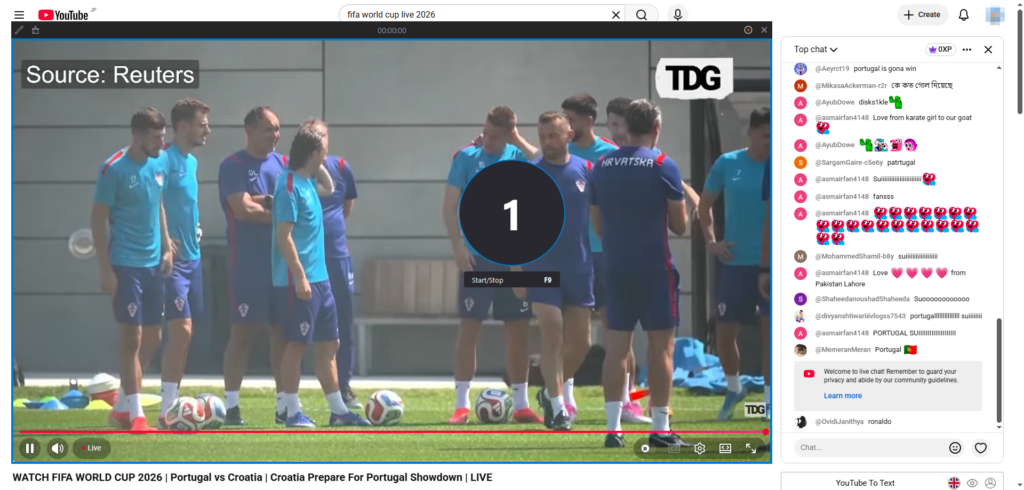
3. Conclusion
The FIFA Club World Cup 2026 promises exciting matches featuring some of the biggest clubs in world football. Fortunately, fans have numerous ways to watch the tournament, including DAZN, regional TV broadcasters, live TV streaming services, and official mobile apps. With so many options available, finding a viewing method that suits your location and devices is easier than ever.
If your schedule prevents you from watching every match live, Swyshare Recordit offers a simple and reliable solution. Its HD recording quality, system audio capture, scheduled recording feature, and user-friendly interface make it an excellent companion for football fans who don’t want to miss a single goal, save, or trophy celebration. By combining an official live stream with Recordit, you can enjoy every unforgettable moment of the FIFA Club World Cup whenever it suits you best.