How to Download Anime from AnimeKai in HD Quality?

Anime streaming has become more popular than ever, with fans around the world looking for convenient ways to watch their favorite shows anytime, anywhere. While streaming platforms are great, many users prefer downloading anime episodes for offline viewing, smoother playback, or building a personal collection. One site that has gained attention among anime fans is AnimeKai.
However, downloading from streaming sites like AnimeKai isn’t always straightforward. There is often no direct download button, and users may encounter ads, pop-ups, or playback restrictions. That’s why it’s important to understand safe and effective methods to download anime in HD quality.
In this guide, we’ll explain what AnimeKai is and walk you through the best ways to download anime from AnimeKai.
1. What Is AnimeKai and Its Domains
AnimeKai is a free anime streaming website that offers a wide range of anime series and movies, including both subbed and dubbed versions. It’s known for its fast streaming speeds, clean interface, and access to high-definition content, often up to 1080p.
Since sites like AnimeKai frequently change domains due to restrictions or availability issues, users may encounter different versions of the platform. Some of the most commonly used AnimeKai domains include:
- animekai.to (most used)
- animekai.bz
- animekai.com
- animekai.ko
- animekai.ac
- animekai.me
These mirror sites typically provide similar content and features, allowing users to continue watching anime even if one domain becomes unavailable.
While AnimeKai is convenient for streaming, it does not usually provide a built-in download option. This leads many users to explore alternative methods to save videos in HD quality.
2. How to Download Anime from AnimeKai in HD Quality?
There are several ways to download anime from AnimeKai. Below are the most effective methods, starting with the most recommended one.
2.1 Best Recommended: Record AnimeKai with Swyshare Recordit
One of the simplest and most reliable ways to download anime from AnimeKai is by using a screen recorder like Swyshare Recordit. Since AnimeKai streams videos directly in your browser, screen recording allows you to capture the video in real time without dealing with broken links or unsupported downloads.
Why choose Recordit to record AnimeKai:
- Works on any streaming site, including AnimeKai
- Records in high definition (up to 1080p)
- Captures system audio for clear anime sound
- Quick export recording in popular MP4 and more formats
- No need to find download links
- Simple and beginner-friendly
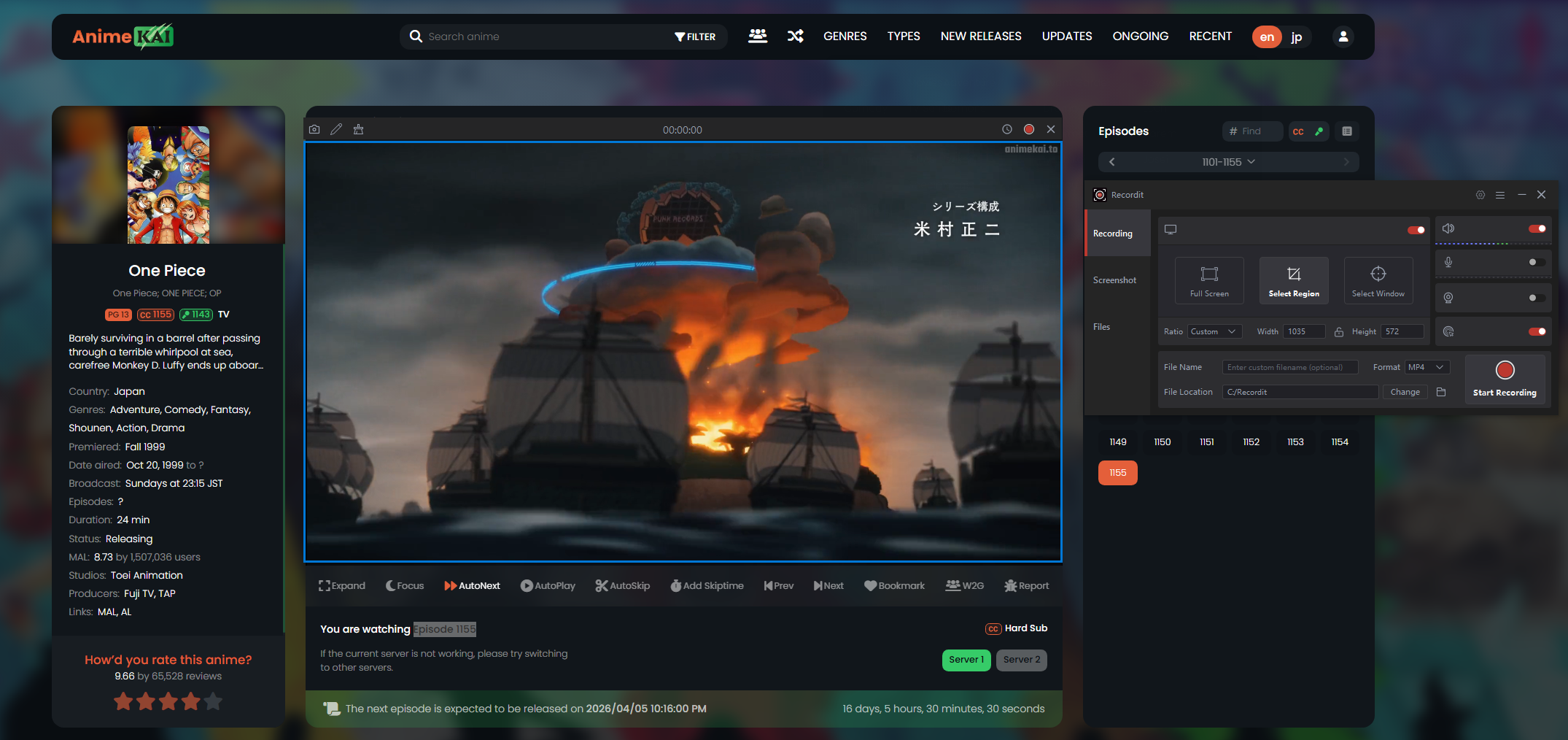
Steps to download AnimeKai videos using Recordit:
- Install and launch the Windows or Mac version of Recordit on your computer.
- Open AnimeKai in your browser and navigate to the anime episode you want to download, e.g. One Piece Episode 1155.
- Set the recording area to match the video player window, then enable system audio to capture sound.
- Start recording and play the anime episode.
- Once the episode finishes, stop the recording and find the recorded anime videos under Recordit’s “Files” tab.
2.2 Download AnimeKai Using Video Downloader Extensions
Another common method is using browser extensions designed to detect and download videos from web pages. These tools can sometimes identify the video stream used by AnimeKai and allow you to download it directly.
Popular extension features:
- Detects video files embedded in web pages
- Offers multiple resolution options (if available)
- One-click download from the browser
How to use:
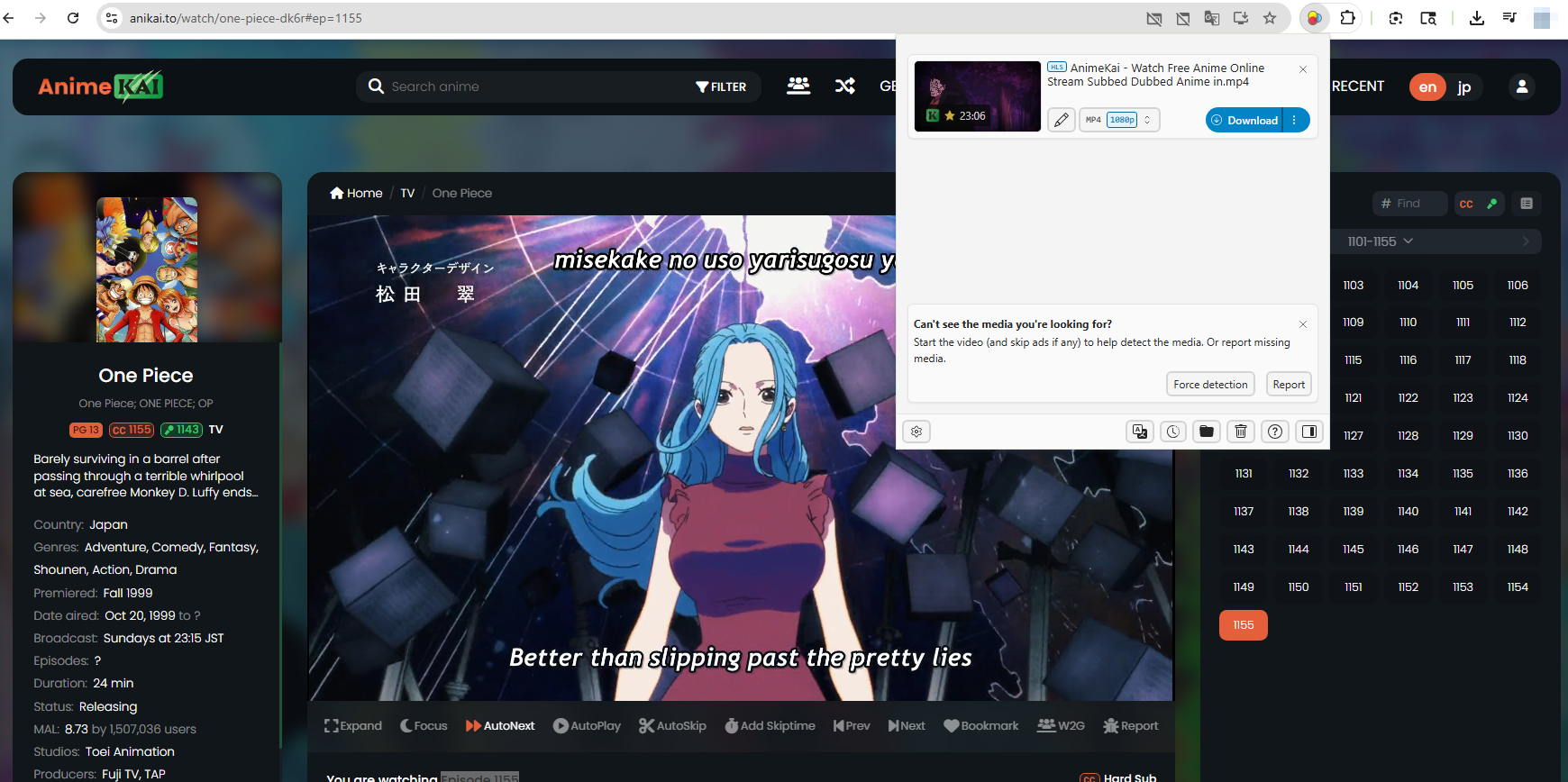
- Install a video downloader extension (e.g. Video DownloadHelper) from your browser’s extension store.
- Open AnimeKai and play the desired episode (e.g. One Piece Episode 1155).
- Click the extension icon to detect available media files, next choose the HD version (if listed) and download it.
Limitations:
- Not all AnimeKai videos are detectable
- Some streams are encrypted or segmented (HLS format)
- Extensions may fail after site updates
- Ads and pop-ups can interfere with detection
While extensions are convenient, they are not always reliable for AnimeKai, especially when the site changes its streaming structure.
2.3 Download AnimeKai Using Video Downloader Software
Desktop video downloader software provides more advanced features compared to browser extensions. These tools can handle complex video streams and sometimes support batch downloading.
Benefits of downloader software:
- Supports high-quality downloads (720p, 1080p)
- Can detect streaming URLs automatically
- Offers faster download speeds
- Some tools support batch downloads
How to use:
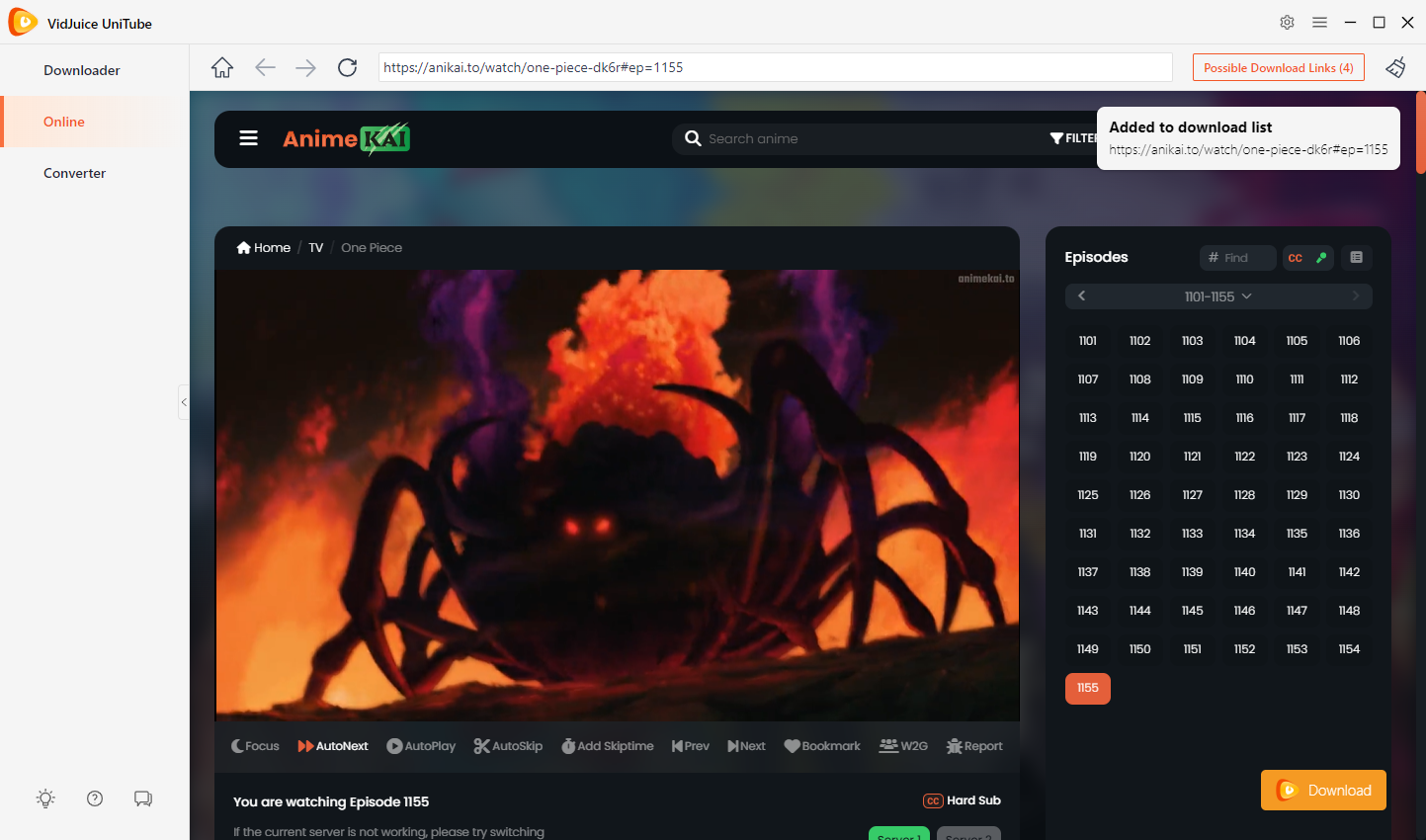
- Install a video downloader software (e.g. VidJuice UniTube) on your PC or Mac.
- Use UniTube’s Online tab to visit the AnimeKai One Piece Episode 1155 page and play the anime.
- Let the software analyze the link, then click the download button to add the episode to UniTube’s download list.
Limitations:
- Some AnimeKai videos may not be supported
- Requires software installation
- Free versions may have limitations
- Not always stable with streaming sites
Although downloader software can be powerful, it still depends on whether the tool can successfully extract the video stream from AnimeKai.
3. Conclusion
Downloading anime from AnimeKai in HD quality can be challenging due to the lack of a direct download option and the presence of streaming restrictions. While browser extensions and video downloader software can sometimes work, they are often inconsistent and may fail depending on the site’s structure.
For a reliable and hassle-free experience, screen recording with Swyshare Recordit stands out as the best solution. It allows you to capture anime episodes in high definition with clear audio, regardless of streaming limitations. You don’t need to worry about broken links, unsupported formats, or failed downloads—just play and record.
If you’re looking for a simple, effective, and stable way to download anime from AnimeKai, Swyshare Recordit is highly recommended.